
Component
X-Ray Hover Effect in Framer
This is a crazy X-ray hover interaction created in Framer, inspired by Cullen Webber’s work. It uses a famous Framer University component called Hover Mask Reveal, and it looks pretty dope. Feel free to remix the project to explore how it’s built and create similar cool stuff for your projects based on what you learn.


About the resource
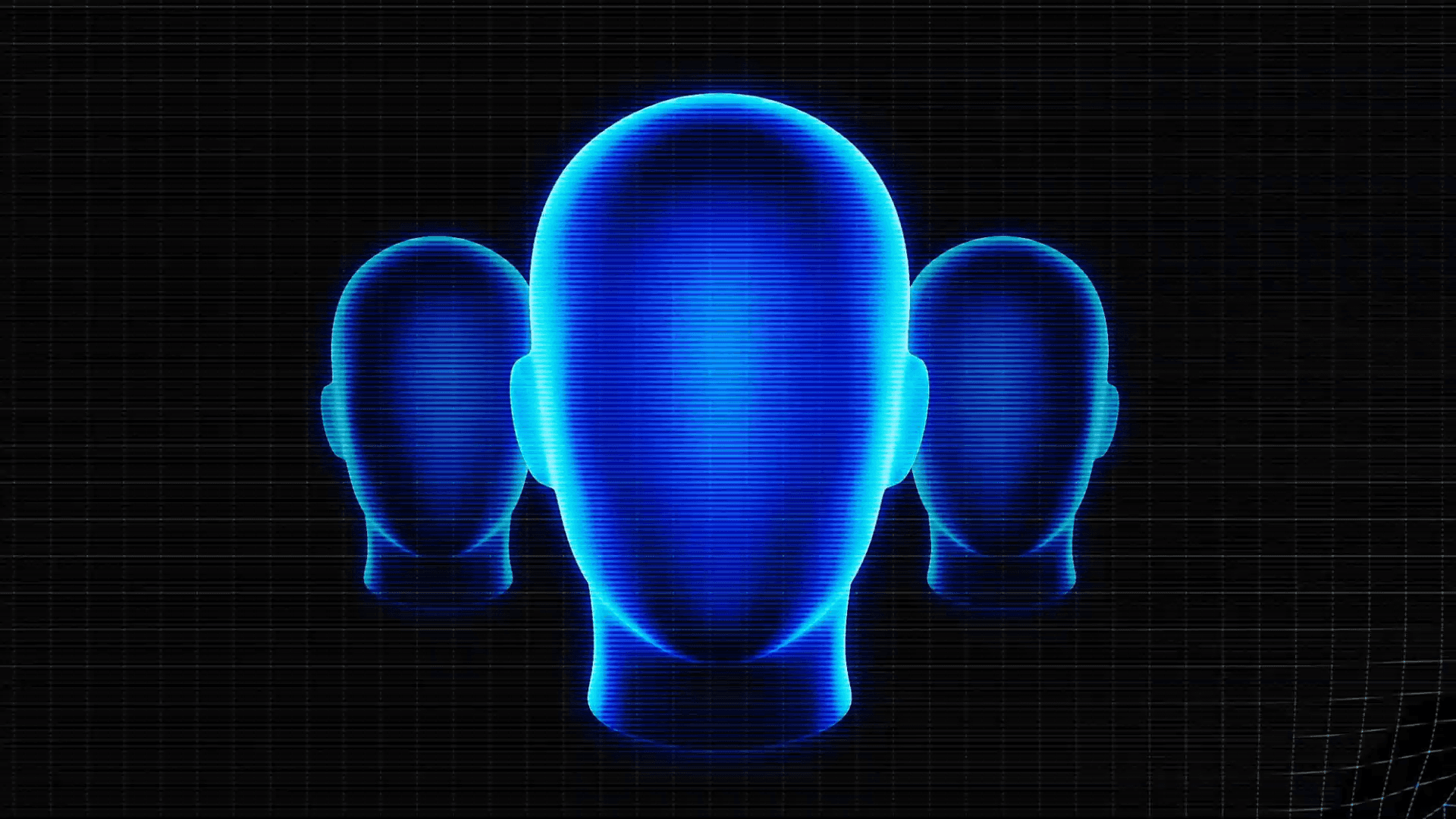
To create this interaction I had to do a few things. First I generated two images with Nano Banana. Three heads right next to each other, and another variation of the same image where the heads have skulls within.
You can copy the prompt I used for the first image below.
About the resource
To create this interaction I had to do a few things. First I generated two images with Nano Banana. Three heads right next to each other, and another variation of the same image where the heads have skulls within.
You can copy the prompt I used for the first image below.
About the resource
To create this interaction I had to do a few things. First I generated two images with Nano Banana. Three heads right next to each other, and another variation of the same image where the heads have skulls within.
You can copy the prompt I used for the first image below.

For the second generation, I just uploaded the previous image and asked for a skull version using the prompt below.
For the second generation, I just uploaded the previous image and asked for a skull version using the prompt below.
For the second generation, I just uploaded the previous image and asked for a skull version using the prompt below.
Once I had these images, I just had to use the Hover Mask Reveal from Framer University, and upload the generated images on the right properties panel.
Once I had these images, I just had to use the Hover Mask Reveal from Framer University, and upload the generated images on the right properties panel.
Once I had these images, I just had to use the Hover Mask Reveal from Framer University, and upload the generated images on the right properties panel.

The images uploaded to the Hover Mask Reveal component.
The images uploaded to the Hover Mask Reveal component.
The images uploaded to the Hover Mask Reveal component.
This already gives us an amazing effect I’m not gonna lie, but we can take this further. What about another component that could spice things up? Maybe the Kinetic Grid component? Let’s try!
This already gives us an amazing effect I’m not gonna lie, but we can take this further. What about another component that could spice things up? Maybe the Kinetic Grid component? Let’s try!
This already gives us an amazing effect I’m not gonna lie, but we can take this further. What about another component that could spice things up? Maybe the Kinetic Grid component? Let’s try!
The Kinetic Grid component layer on top of the Hover Mask effect.
The Kinetic Grid component layer on top of the Hover Mask effect.
The Kinetic Grid component layer on top of the Hover Mask effect.
Yeah, this looks pretty sick. But we need more. Let’s add sort of like a CTR screen effect to this whole thing. I can easily pull that effect off my creating a line pattern, layering it over everything by tiling, and also adding 1px blur as well as overlay blending mode. Perfection.
Yeah, this looks pretty sick. But we need more. Let’s add sort of like a CTR screen effect to this whole thing. I can easily pull that effect off my creating a line pattern, layering it over everything by tiling, and also adding 1px blur as well as overlay blending mode. Perfection.
Yeah, this looks pretty sick. But we need more. Let’s add sort of like a CTR screen effect to this whole thing. I can easily pull that effect off my creating a line pattern, layering it over everything by tiling, and also adding 1px blur as well as overlay blending mode. Perfection.
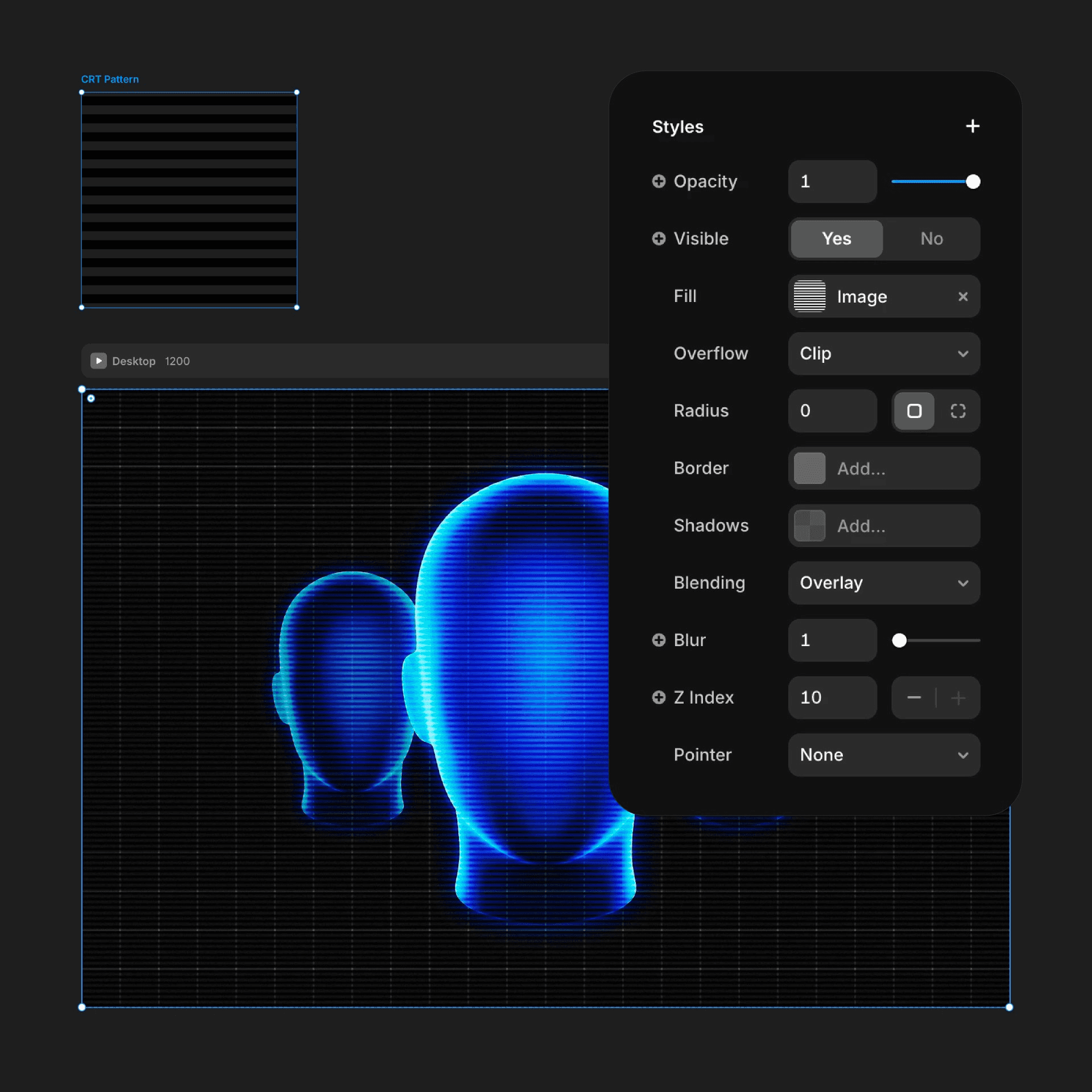
The CTR pattern layered over the section.
The CTR pattern layered over the section.
The CTR pattern layered over the section.
One additional subtle thing I wanted to do is add a blinking screen effect to the whole section to really make it feel like it’s alive. To create that, I just created a dark overlay and wrapped it in a frame. Then both the overlay and the wrapper got loop effects that basically moves the layer opacities between 0 and 1. The trick lies in the transition settings. The wrapper’s and the actual overlay’s loop effect timing is offseted with a delay to make the blinking feel more random.
One additional subtle thing I wanted to do is add a blinking screen effect to the whole section to really make it feel like it’s alive. To create that, I just created a dark overlay and wrapped it in a frame. Then both the overlay and the wrapper got loop effects that basically moves the layer opacities between 0 and 1. The trick lies in the transition settings. The wrapper’s and the actual overlay’s loop effect timing is offseted with a delay to make the blinking feel more random.
One additional subtle thing I wanted to do is add a blinking screen effect to the whole section to really make it feel like it’s alive. To create that, I just created a dark overlay and wrapped it in a frame. Then both the overlay and the wrapper got loop effects that basically moves the layer opacities between 0 and 1. The trick lies in the transition settings. The wrapper’s and the actual overlay’s loop effect timing is offseted with a delay to make the blinking feel more random.
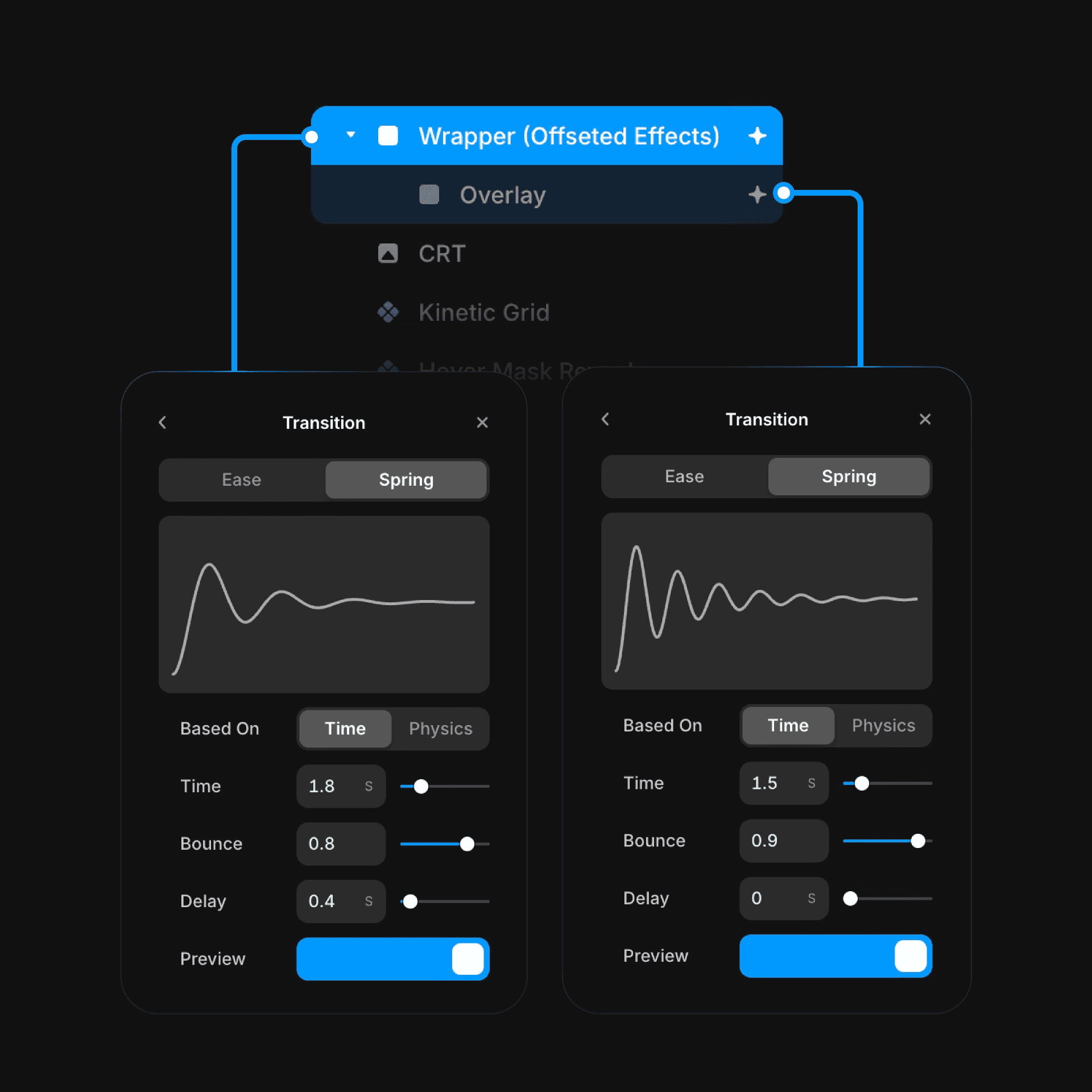
The offseted transition settings on the overlay and its wrapper's loop effect.
The offseted transition settings on the overlay and its wrapper's loop effect.
The offseted transition settings on the overlay and its wrapper's loop effect.
That’s it! It’s that easy to build such interaction in Framer without writing any code. What a dream, isn’t it?
That’s it! It’s that easy to build such interaction in Framer without writing any code. What a dream, isn’t it?
That’s it! It’s that easy to build such interaction in Framer without writing any code. What a dream, isn’t it?


