
Component
Crazy Hover Mask Reveal in Framer
This is a Crazy Hover Mask Reveal component for Framer, recreated from OFF+BRAND's work, that creates a liquid cursor-reactive image swap with organic motion and parallax. It’s fully customizable through property controls and adds a bold, tactile reveal effect to your layouts.





About the resource
To use the component, add your Front image as the default state and the Back image as the one revealed on hover through a liquid mask interaction. The Preview toggle lets you enable or disable the live effect directly on the Framer canvas, making it easy to design with or without motion.
You can enhance the interaction with optional mouse-based Parallax. When enabled, Amount controls how far the effect shifts in pixels, and Smoothing adjusts how soft or snappy the movement feels. Turn Parallax off for a static hover reveal.
Radius defines the border radius of the container, helping the component fit seamlessly into different layouts. Size controls the scale of the liquid splat during interaction, while Strength adjusts how bold and visible the circular reveal appears.
Return time determines how long the mask takes to shrink back after hover ends, allowing you to create either quick resets or slow, fluid transitions. Edge grain adds texture to the liquid boundary for a more organic feel, and Swirl controls the curl intensity of the mask, giving the reveal more motion character.
About the resource
To use the component, add your Front image as the default state and the Back image as the one revealed on hover through a liquid mask interaction. The Preview toggle lets you enable or disable the live effect directly on the Framer canvas, making it easy to design with or without motion.
You can enhance the interaction with optional mouse-based Parallax. When enabled, Amount controls how far the effect shifts in pixels, and Smoothing adjusts how soft or snappy the movement feels. Turn Parallax off for a static hover reveal.
Radius defines the border radius of the container, helping the component fit seamlessly into different layouts. Size controls the scale of the liquid splat during interaction, while Strength adjusts how bold and visible the circular reveal appears.
Return time determines how long the mask takes to shrink back after hover ends, allowing you to create either quick resets or slow, fluid transitions. Edge grain adds texture to the liquid boundary for a more organic feel, and Swirl controls the curl intensity of the mask, giving the reveal more motion character.
About the resource
To use the component, add your Front image as the default state and the Back image as the one revealed on hover through a liquid mask interaction. The Preview toggle lets you enable or disable the live effect directly on the Framer canvas, making it easy to design with or without motion.
You can enhance the interaction with optional mouse-based Parallax. When enabled, Amount controls how far the effect shifts in pixels, and Smoothing adjusts how soft or snappy the movement feels. Turn Parallax off for a static hover reveal.
Radius defines the border radius of the container, helping the component fit seamlessly into different layouts. Size controls the scale of the liquid splat during interaction, while Strength adjusts how bold and visible the circular reveal appears.
Return time determines how long the mask takes to shrink back after hover ends, allowing you to create either quick resets or slow, fluid transitions. Edge grain adds texture to the liquid boundary for a more organic feel, and Swirl controls the curl intensity of the mask, giving the reveal more motion character.
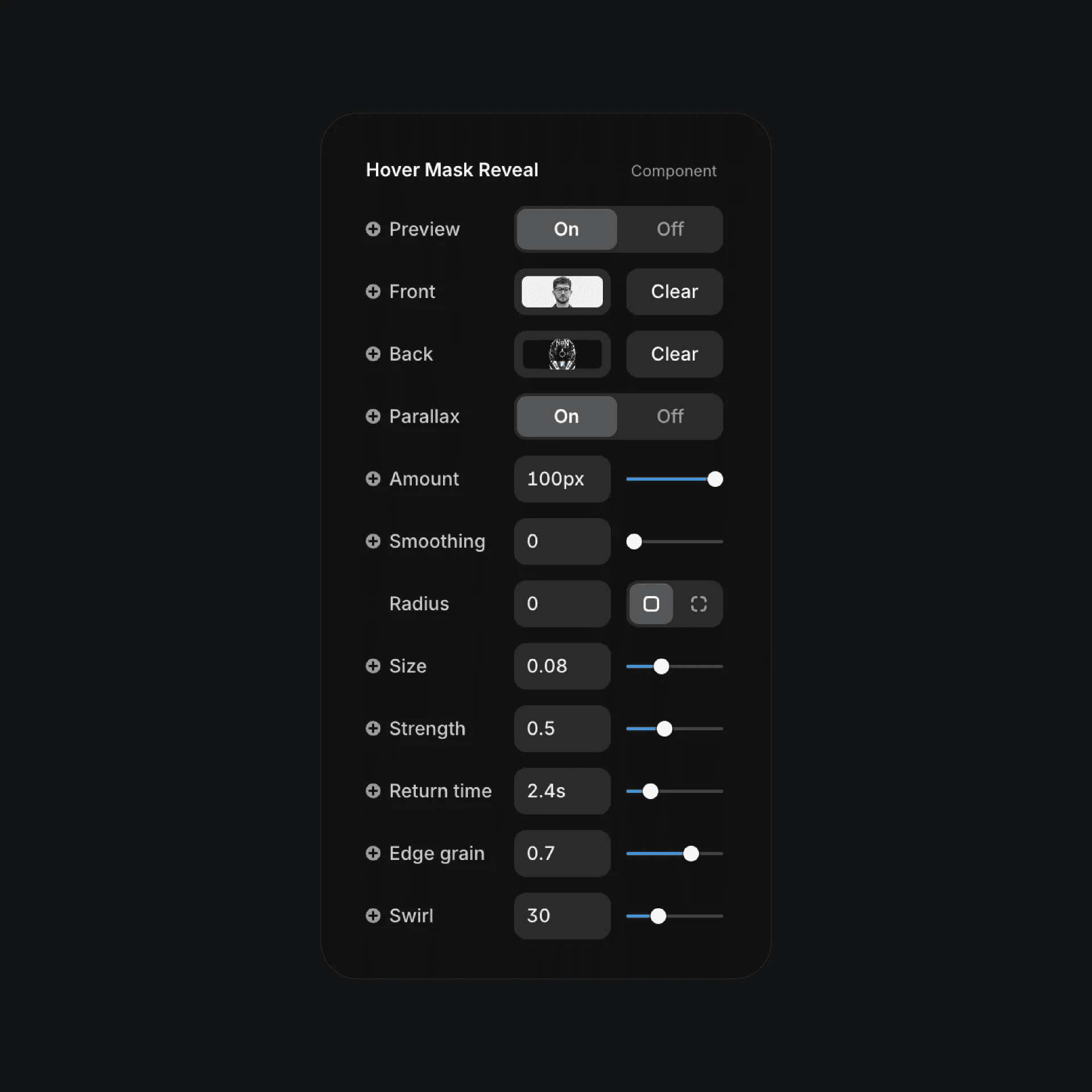
The hover mask reveal component properties in Framer.
The hover mask reveal component properties in Framer.
The hover mask reveal component properties in Framer.


