Component
Blinds Text Reveal Component for Framer
This is a Blinds Text Reveal component for Framer, recreated from OFF+BRAND's work on the Lando Norris website. Each line of text is covered by an animated strip that opens to reveal the content beneath. Fully customizable through property controls, remix it and make it your own.





About the resource
To use this component, drop it into your Framer project and type your text into the Text field. Each line gets its own blind, so line breaks in that field control how the reveal is structured, short punchy lines give you more strips to work with.
Choose a Trigger to decide when the animation fires: Appear runs it as soon as the component is visible, while Layer in View holds it until the user scrolls to it. If you go with scroll, the Start control lets you time exactly where in the viewport the reveal kicks off, and Replay decides whether it re-animates when scrolling back up.
From there, shape the feel with Mode, Direction, and Alternate. Out moves the blinds away to reveal the text; In–Out closes them first, then opens, a two-phase effect that feels more dramatic. Direction sets which way they travel, and Alternate flips odd and even lines in opposite directions for a more dynamic look. Order and Stagger control the sequence and pacing of each line coming in.
For styling, use Color and Blinds to set the text and strip colors, Font for all your type settings, and Tag to pick the right HTML element for semantics, h1 for a main heading, p for body copy, and so on.
About the resource
To use this component, drop it into your Framer project and type your text into the Text field. Each line gets its own blind, so line breaks in that field control how the reveal is structured, short punchy lines give you more strips to work with.
Choose a Trigger to decide when the animation fires: Appear runs it as soon as the component is visible, while Layer in View holds it until the user scrolls to it. If you go with scroll, the Start control lets you time exactly where in the viewport the reveal kicks off, and Replay decides whether it re-animates when scrolling back up.
From there, shape the feel with Mode, Direction, and Alternate. Out moves the blinds away to reveal the text; In–Out closes them first, then opens, a two-phase effect that feels more dramatic. Direction sets which way they travel, and Alternate flips odd and even lines in opposite directions for a more dynamic look. Order and Stagger control the sequence and pacing of each line coming in.
For styling, use Color and Blinds to set the text and strip colors, Font for all your type settings, and Tag to pick the right HTML element for semantics, h1 for a main heading, p for body copy, and so on.
About the resource
To use this component, drop it into your Framer project and type your text into the Text field. Each line gets its own blind, so line breaks in that field control how the reveal is structured, short punchy lines give you more strips to work with.
Choose a Trigger to decide when the animation fires: Appear runs it as soon as the component is visible, while Layer in View holds it until the user scrolls to it. If you go with scroll, the Start control lets you time exactly where in the viewport the reveal kicks off, and Replay decides whether it re-animates when scrolling back up.
From there, shape the feel with Mode, Direction, and Alternate. Out moves the blinds away to reveal the text; In–Out closes them first, then opens, a two-phase effect that feels more dramatic. Direction sets which way they travel, and Alternate flips odd and even lines in opposite directions for a more dynamic look. Order and Stagger control the sequence and pacing of each line coming in.
For styling, use Color and Blinds to set the text and strip colors, Font for all your type settings, and Tag to pick the right HTML element for semantics, h1 for a main heading, p for body copy, and so on.
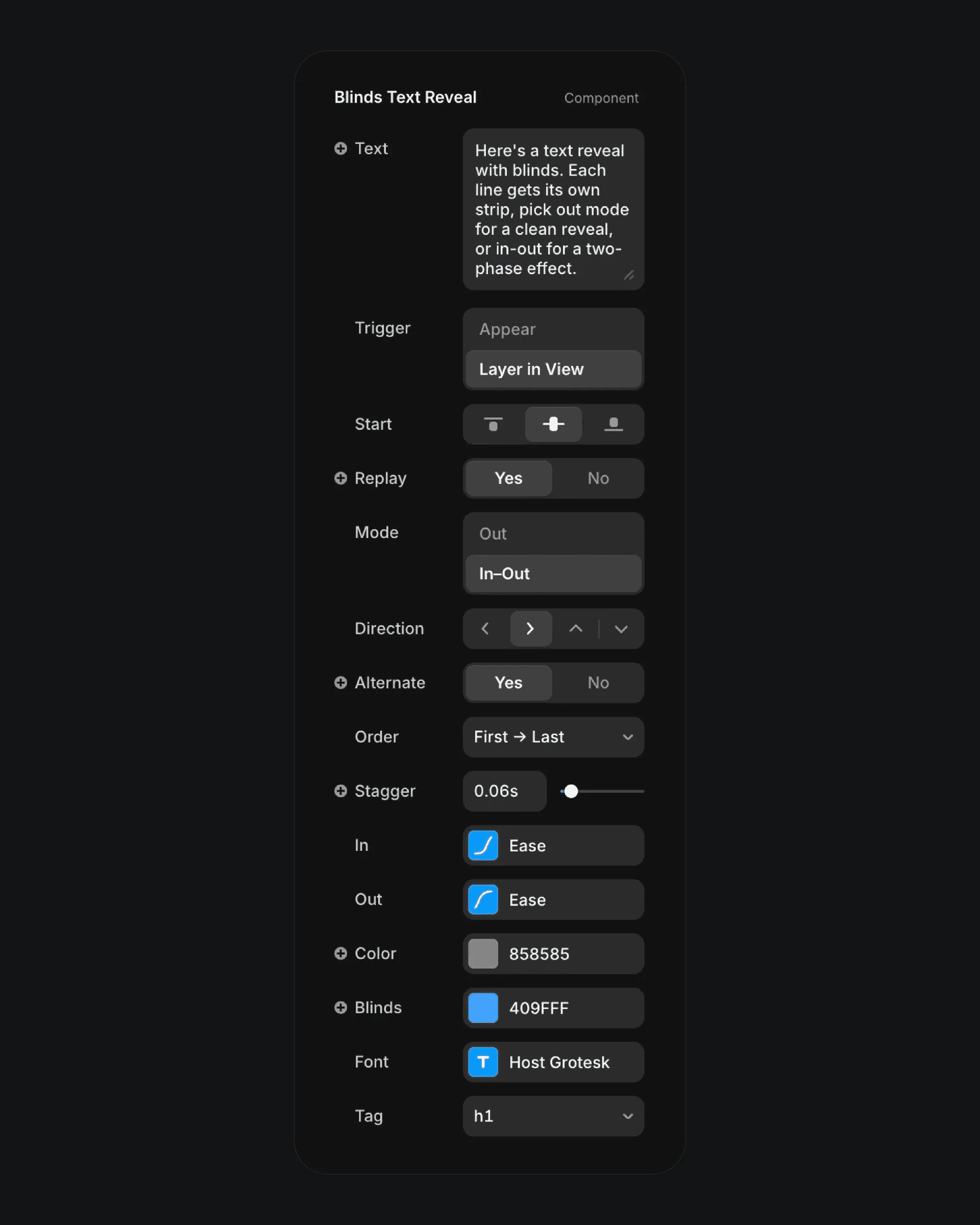
The blinds text reveal component properties in Framer.
The blinds text reveal component properties in Framer.
The blinds text reveal component properties in Framer.