
Component
Proximity Effects in Framer
This is a Proximity Effects property control for Framer that lets elements react to the cursor through scale, rotation, opacity, borders, and radius, all driven by distance. You can copy it into your projects to add proximity-based, cursor-responsive interactions without writing any code.




About the resource
To use this proximity effects property control, add the component to your Framer canvas and place the elements you want to react stacked with it. Set the Mode to Auto if you want scale, rotation, opacity, and motion to be applied directly to each element, or switch it to Components if you only want border and radius changes to affect the direct children of each element, which is useful when you are working with nested components.
Adjust the Influence value to decide how far the cursor can reach. A smaller value keeps the effect tight and focused, while a larger value makes more elements respond at once. Use Magnet to define whether elements are pulled toward the cursor or pushed away from it, giving you either a spring-like attraction or a repulsion effect.
Then fine-tune the Near and Far values for Scale, Rotation, and Opacity to control how elements should look when the cursor is close versus when it is outside the influence radius. Finally, use the Border and Radius Near and Far settings to visually morph cards and blocks as they come into focus, letting you create everything from subtle hover depth to fully reactive, magnetic layouts.
About the resource
To use this proximity effects property control, add the component to your Framer canvas and place the elements you want to react stacked with it. Set the Mode to Auto if you want scale, rotation, opacity, and motion to be applied directly to each element, or switch it to Components if you only want border and radius changes to affect the direct children of each element, which is useful when you are working with nested components.
Adjust the Influence value to decide how far the cursor can reach. A smaller value keeps the effect tight and focused, while a larger value makes more elements respond at once. Use Magnet to define whether elements are pulled toward the cursor or pushed away from it, giving you either a spring-like attraction or a repulsion effect.
Then fine-tune the Near and Far values for Scale, Rotation, and Opacity to control how elements should look when the cursor is close versus when it is outside the influence radius. Finally, use the Border and Radius Near and Far settings to visually morph cards and blocks as they come into focus, letting you create everything from subtle hover depth to fully reactive, magnetic layouts.
About the resource
To use this proximity effects property control, add the component to your Framer canvas and place the elements you want to react stacked with it. Set the Mode to Auto if you want scale, rotation, opacity, and motion to be applied directly to each element, or switch it to Components if you only want border and radius changes to affect the direct children of each element, which is useful when you are working with nested components.
Adjust the Influence value to decide how far the cursor can reach. A smaller value keeps the effect tight and focused, while a larger value makes more elements respond at once. Use Magnet to define whether elements are pulled toward the cursor or pushed away from it, giving you either a spring-like attraction or a repulsion effect.
Then fine-tune the Near and Far values for Scale, Rotation, and Opacity to control how elements should look when the cursor is close versus when it is outside the influence radius. Finally, use the Border and Radius Near and Far settings to visually morph cards and blocks as they come into focus, letting you create everything from subtle hover depth to fully reactive, magnetic layouts.
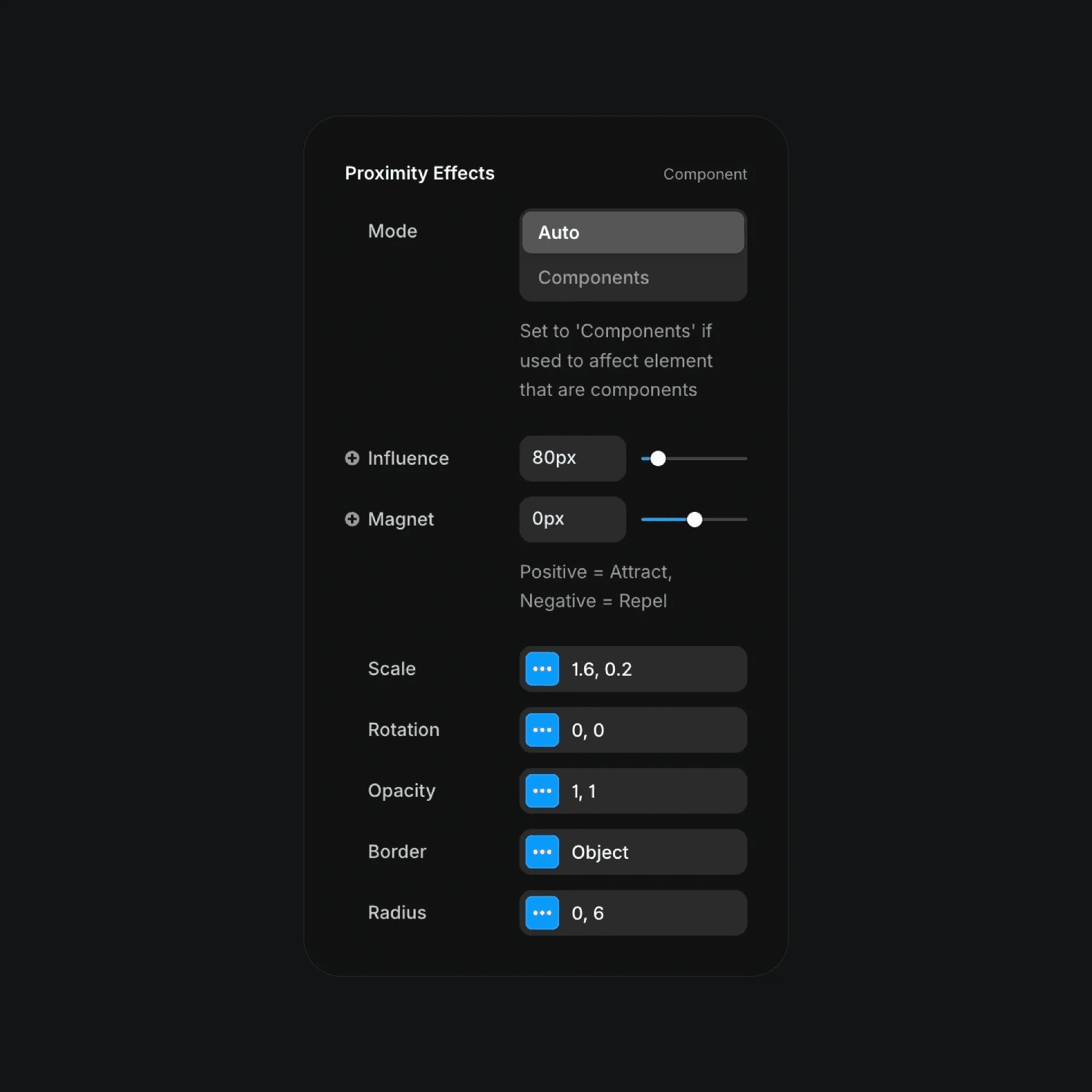
The proximity effects component properties in Framer.
The proximity effects component properties in Framer.
The proximity effects component properties in Framer.


