
Component
Folder Open Up Animation in Framer
This is a folder open up animation recreated in Framer from Raul’s original work, built using 3D transforms. Remix the project to explore how this interaction is structured and controlled entirely in Framer, or simply copy it into your own project to use it directly.




About the resource
To use the folder open up component, I built it with three variants to represent different states: default, hover, and clicked. In the default state, the folder stays closed.
For the hover state, the three paper layers move slightly upward and peek out from the front, while the folder begins to open. In the clicked state, the front layer rotates further on the X axis and the papers spread out of the folder.
To achieve this, I applied a 3D transform to the front layer and adjusted the origin so it rotates only from the bottom edge of the folder. The paper layers are stacked between the front and back layers and positioned absolutely, which allows them to slide upward on hover. On click, the front layer rotates from around -40 to -70 degrees on the X axis. All state changes are handled using mouse enter and click interactions to smoothly switch between variants.
About the resource
To use the folder open up component, I built it with three variants to represent different states: default, hover, and clicked. In the default state, the folder stays closed.
For the hover state, the three paper layers move slightly upward and peek out from the front, while the folder begins to open. In the clicked state, the front layer rotates further on the X axis and the papers spread out of the folder.
To achieve this, I applied a 3D transform to the front layer and adjusted the origin so it rotates only from the bottom edge of the folder. The paper layers are stacked between the front and back layers and positioned absolutely, which allows them to slide upward on hover. On click, the front layer rotates from around -40 to -70 degrees on the X axis. All state changes are handled using mouse enter and click interactions to smoothly switch between variants.
About the resource
To use the folder open up component, I built it with three variants to represent different states: default, hover, and clicked. In the default state, the folder stays closed.
For the hover state, the three paper layers move slightly upward and peek out from the front, while the folder begins to open. In the clicked state, the front layer rotates further on the X axis and the papers spread out of the folder.
To achieve this, I applied a 3D transform to the front layer and adjusted the origin so it rotates only from the bottom edge of the folder. The paper layers are stacked between the front and back layers and positioned absolutely, which allows them to slide upward on hover. On click, the front layer rotates from around -40 to -70 degrees on the X axis. All state changes are handled using mouse enter and click interactions to smoothly switch between variants.
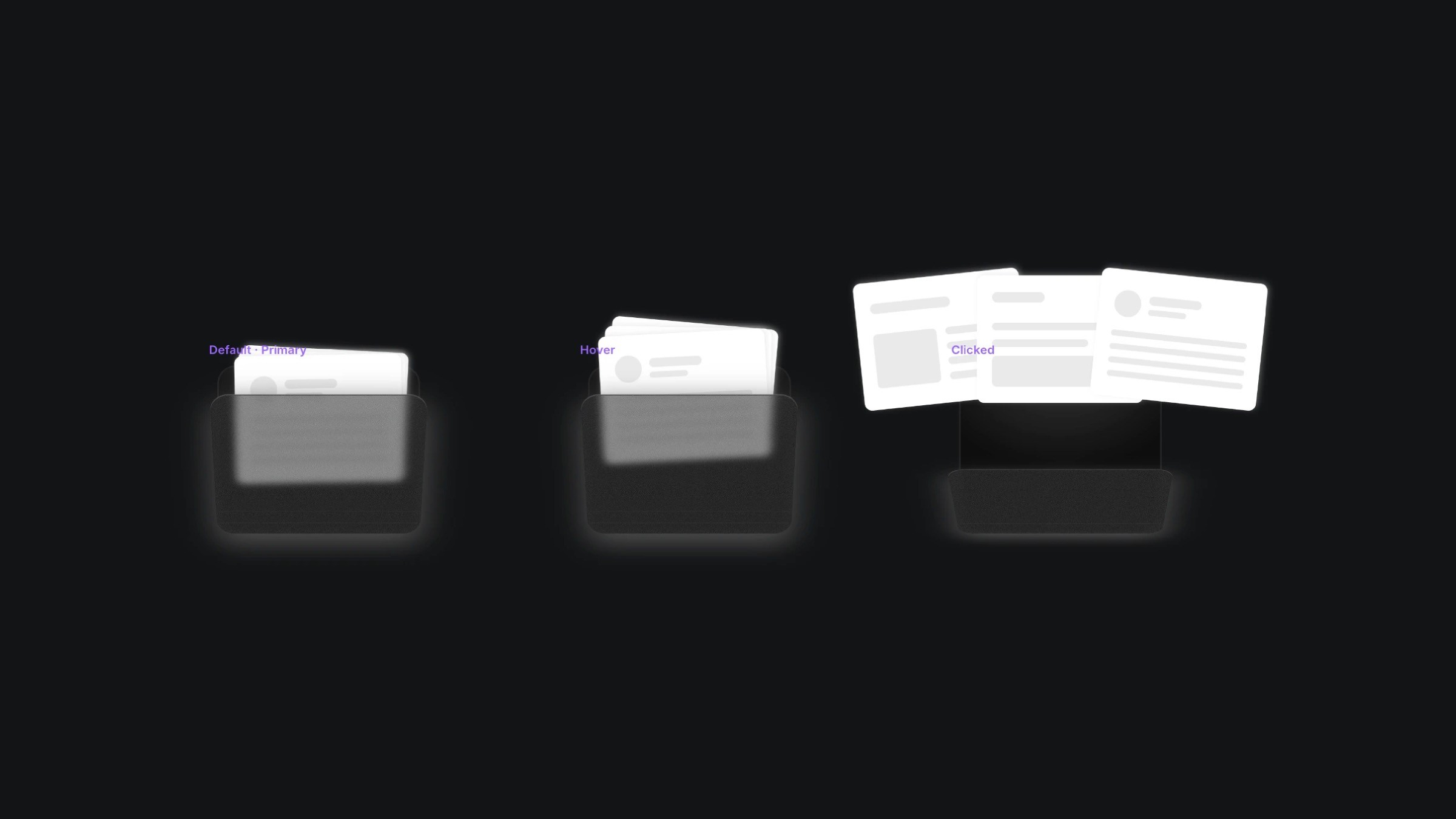
The three variants of the folder component.
The three variants of the folder component.
The three variants of the folder component.


