Interactive Map Interaction in Framer

Copy component

Copy component

Interactive Map Interaction in Framer

Copy component

Nandi Muzsik

How can I improve Framer Uni?

Let me know if there’s a missing feature or something that could be improved.

Share feedback

How to Make $10K+ with Framer in 60 days

$10k Undercover Event

Component

Interactive Map Interaction in Framer

This is an interactive map recreated in Framer from Kumail's work. Remix the project and explore how to create this type of interaction in Framer without writing any code.


image of Nandi Muzsik
image of Prianca S.
Image of Kumail

Created by

Interactive map on an iPhone displaying One Apple Park Way, Cupertino, CA

About the resource

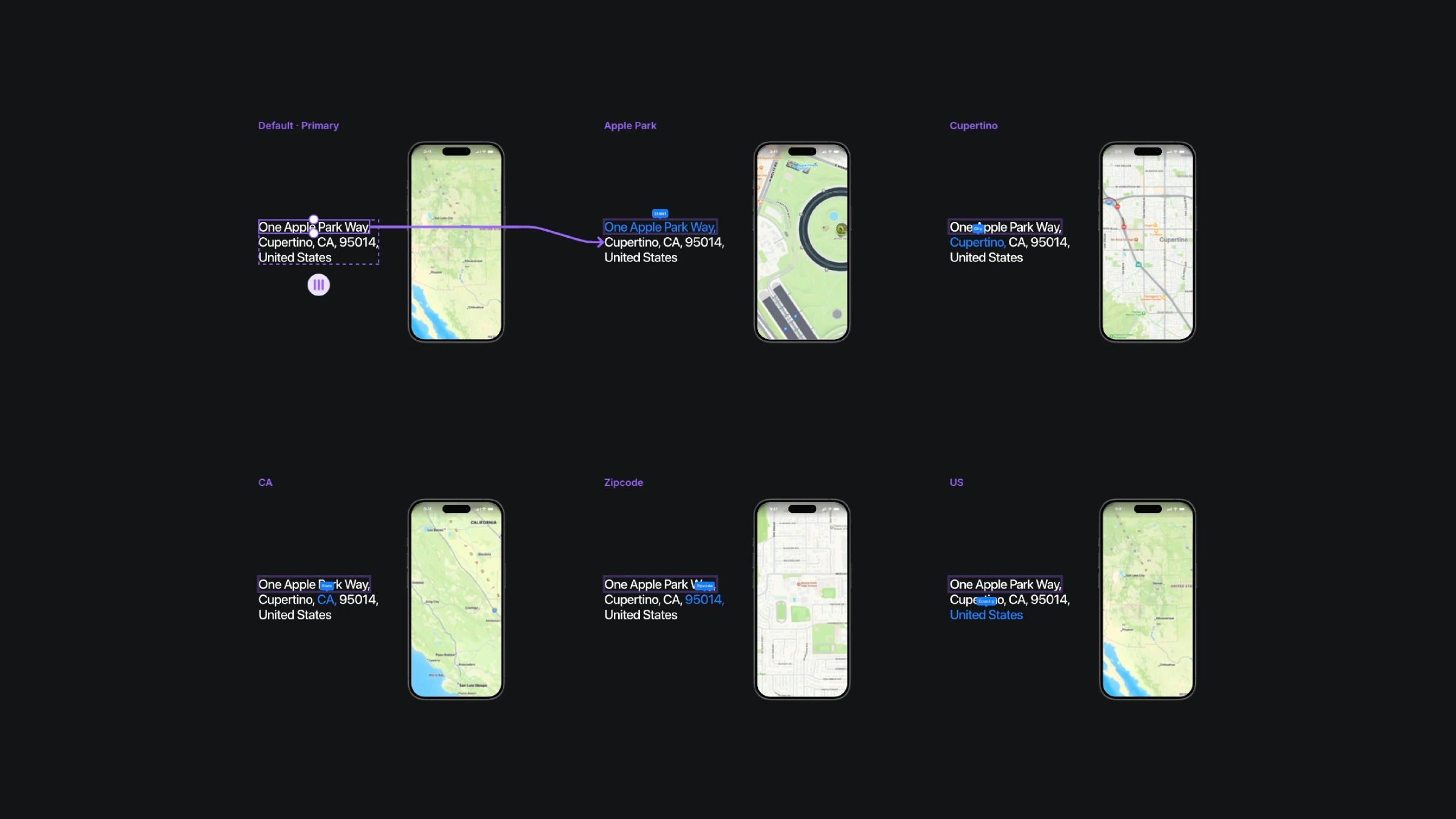
This interaction consists of three components: Title hover, Map zoom, and a wrapper component called Interactive map. Each component has its own variants, which are connected through click interactions to create the animations.
About the resource

This interaction consists of three components: Title hover, Map zoom, and a wrapper component called Interactive map. Each component has its own variants, which are connected through click interactions to create the animations.

About the resource

This interaction consists of three components: Title hover, Map zoom, and a wrapper component called Interactive map. Each component has its own variants, which are connected through click interactions to create the animations.

Multiple iPhone screens displaying different map views of One Apple Park Way, Cupertino, CA

The six variants of the interactive map component.

Multiple iPhone screens displaying different map views of One Apple Park Way, Cupertino, CA

The six variants of the interactive map component.

Multiple iPhone screens displaying different map views of One Apple Park Way, Cupertino, CA

The six variants of the interactive map component.

For example, in the map zoom component, I placed all map images nested within each other and set the opacity to 0. In its variants, I simply scaled up the main frame, adjusted the opacity to 1, and changed its offset values to achieve that zoomed-in effect.

For example, in the map zoom component, I placed all map images nested within each other and set the opacity to 0. In its variants, I simply scaled up the main frame, adjusted the opacity to 1, and changed its offset values to achieve that zoomed-in effect.

For example, in the map zoom component, I placed all map images nested within each other and set the opacity to 0. In its variants, I simply scaled up the main frame, adjusted the opacity to 1, and changed its offset values to achieve that zoomed-in effect.

Series of map zoom levels from the U.S. to Apple Park, Cupertino, CA

The five variants of the map zoom component.

Series of map zoom levels from the U.S. to Apple Park, Cupertino, CA

The five variants of the map zoom component.

Series of map zoom levels from the U.S. to Apple Park, Cupertino, CA

The five variants of the map zoom component.

Learn how can one go from 0 to $11.5k with Framer in 60 days.

From no followers, no portfolio, no reputation, to making thousands with a profitable Framer business.

Nandi portrait's background

Learn how can one go from 0 to $11.5k with Framer in 60 days.

From no followers, no portfolio, no reputation, to making thousands with a profitable Framer business.

Nandi portrait's background

Learn how can one go from 0 to $11.5k with Framer in 60 days.

From no followers, no portfolio, no reputation, to making thousands with a profitable Framer business.

Nandi portrait's background

More resources

More resources

  • Music app playlist created screen with artist avatars

    Playlist Generation Circular Animation in Framer

    Component

    Music app playlist created screen with artist avatars

    Playlist Generation Circular Animation in Framer

    Component

  • Customer testimonials section with review letter card

    3D Letter Testimonials in Framer

    Component

    Customer testimonials section with review letter card

    3D Letter Testimonials in Framer

    Component