Website
3D Hero Section Template in Framer
This is a 3D hero section template in Framer that helps you explore responsive structure, code components, video integration, element animations, and reusable components. Remix the file to dig into how the entire template is built and how the pieces work together.



About the resource
This template shows how I put together a full 3D hero section template in Framer using a mix of code and no-code components, focusing on structure, animation, and reusability. To create this website, I set up a responsive layout and included everything you need to follow along, including the video, background graphics, icons, logos, and a clear step-by-step roadmap so you can build the entire site from scratch.
In the hero section, I start with a navigation component that appears on load, followed by a video wrap component that holds the video, hover variants, and a soft appear effect. I then add reusable button components and an Interactive Animated 3D globe to bring in depth and movement.
Below that, I stack the logos and animate them using a ticket-style effect. In the next section, I create the Connect text hover repeat effect by overlapping multiple text layers and applying the parallax floating component with custom settings for each layer. I use an animated pattern background component here, followed by a row of simple card components.
I wrap everything up with a footer component that uses link components with hover variants, so you can clearly see how all the pieces come together into a complete website.
About the resource
This template shows how I put together a full 3D hero section template in Framer using a mix of code and no-code components, focusing on structure, animation, and reusability. To create this website, I set up a responsive layout and included everything you need to follow along, including the video, background graphics, icons, logos, and a clear step-by-step roadmap so you can build the entire site from scratch.
In the hero section, I start with a navigation component that appears on load, followed by a video wrap component that holds the video, hover variants, and a soft appear effect. I then add reusable button components and an Interactive Animated 3D globe to bring in depth and movement.
Below that, I stack the logos and animate them using a ticket-style effect. In the next section, I create the Connect text hover repeat effect by overlapping multiple text layers and applying the parallax floating component with custom settings for each layer. I use an animated pattern background component here, followed by a row of simple card components.
I wrap everything up with a footer component that uses link components with hover variants, so you can clearly see how all the pieces come together into a complete website.
About the resource
This template shows how I put together a full 3D hero section template in Framer using a mix of code and no-code components, focusing on structure, animation, and reusability. To create this website, I set up a responsive layout and included everything you need to follow along, including the video, background graphics, icons, logos, and a clear step-by-step roadmap so you can build the entire site from scratch.
In the hero section, I start with a navigation component that appears on load, followed by a video wrap component that holds the video, hover variants, and a soft appear effect. I then add reusable button components and an Interactive Animated 3D globe to bring in depth and movement.
Below that, I stack the logos and animate them using a ticket-style effect. In the next section, I create the Connect text hover repeat effect by overlapping multiple text layers and applying the parallax floating component with custom settings for each layer. I use an animated pattern background component here, followed by a row of simple card components.
I wrap everything up with a footer component that uses link components with hover variants, so you can clearly see how all the pieces come together into a complete website.
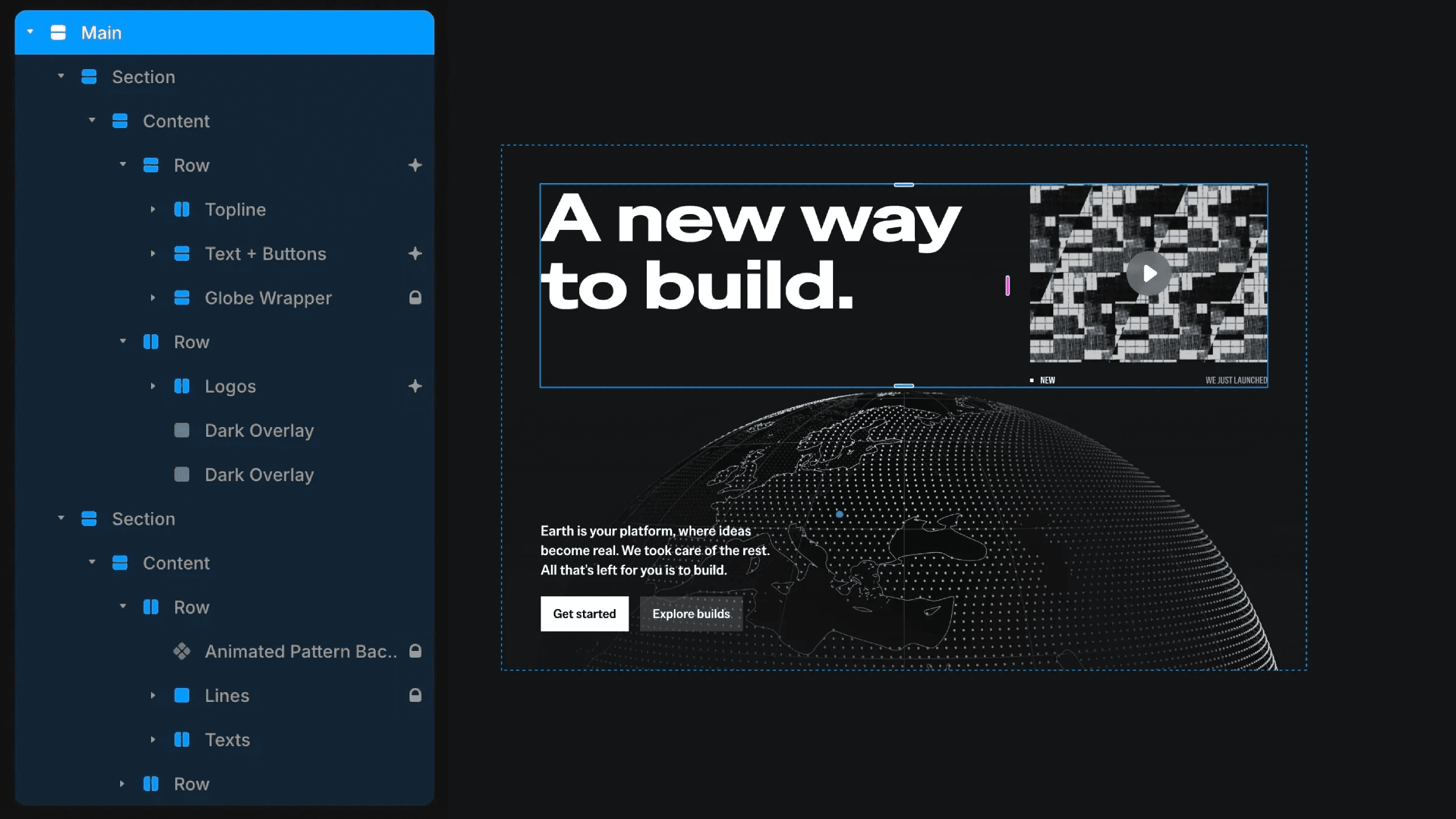
The responsive structure of the website with multiple layers.
The responsive structure of the website with multiple layers.
The responsive structure of the website with multiple layers.